
Microsoft Makes AI Agents in OneDrive Generally Available
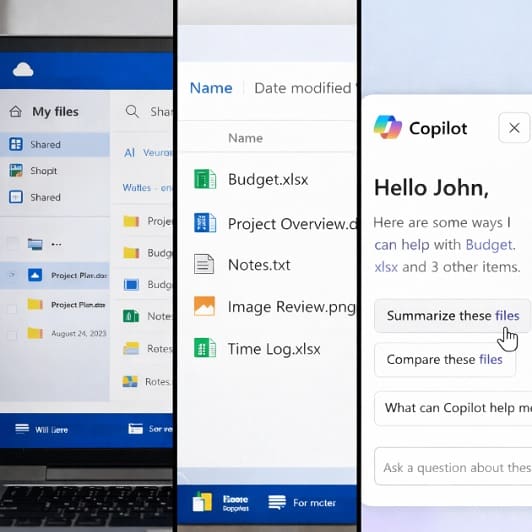
Microsoft has made AI-powered Agents in OneDrive generally available, allowing users to create persistent Copilot assistants that work across multiple documents rather than individual files.
What Are AI Powered Agents?
AI-powered agents in OneDrive are persistent Copilot assistants built from a user selected set of files, designed to understand and work across multiple documents at once rather than responding to single file prompts. For example, instead of querying individual documents separately, users can now create an agent that draws exclusively on up to 20 chosen files, such as project plans, meeting notes, specifications or research material, and uses that content to answer questions, summarise decisions, identify risks, and surface key information while retaining context over time.
As Microsoft explains in its OneDrive announcement, “Rather than asking Copilot the same questions across individual files, you can now create an Agent that understands an entire set of documents, project plans, specs, meeting notes, research, or decks, and responds with answers grounded in your content.”
These agents are saved as .agent files in OneDrive and, when opened, an agent launches a full-screen Copilot experience that remains centred on the selected project or topic rather than switching context between files. This allows users and teams to interact with their own information in a more structured and continuous way, with agents appearing alongside documents, spreadsheets, and presentations in OneDrive.
Generally Available (Worldwide)
In this latest announcement, Microsoft has confirmed the general availability of these Agents in OneDrive. Agents are available worldwide on OneDrive on the web and require a Microsoft 365 Copilot licence.
The move forms part of Microsoft’s wider effort to embed AI more deeply into everyday productivity tools, with a focus on retaining context, reducing repetitive work, and improving how teams manage and interpret large volumes of information over time.
How Agents Are Created And Used
Agents can be created directly within OneDrive on the web without any additional administrative setup. For example, users can either select files and choose the option to create an agent from the toolbar or right-click menu, or start from the Create option and build an agent around uploaded content. During creation, users name the agent and can add optional instructions to guide how it responds.
Once created, agents behave like any other file in OneDrive. They can be searched for, filtered by file type, opened, renamed, and updated as projects change. Files can be added or removed from an agent, and instructions can be refined to reflect new priorities or information. Sharing works in the same way as other OneDrive files, with access dependent on whether collaborators already have permission to view the underlying source documents.
Microsoft says that this approach allows an agent to support collaboration without introducing additional complexity, noting that “The agent can provide complete, grounded responses keeping everyone aligned without extra handoffs.”
Why Microsoft Is Introducing OneDrive Agents?
The introduction of agents reflects Microsoft’s current view that AI tools need to move beyond one-off prompts and retain working context over time. In its OneDrive announcement, Microsoft says the feature is aimed at users who want Copilot to remember the context of a project, understand the documents a team already relies on, and answer recurring questions without retracing previous steps.
This aligns with Microsoft’s broader Copilot strategy across Microsoft 365, which increasingly focuses on task continuity, shared understanding, and collaborative workflows rather than isolated productivity gains. By anchoring AI interactions to a defined set of documents, Microsoft is attempting to make Copilot more predictable, more relevant, and easier to trust in day-to-day business use.
Who Are Agents For?
Agents in OneDrive are primarily targeted at business and professional users already working within the Microsoft 365 ecosystem. The requirement for a Microsoft 365 Copilot licence means the feature is positioned squarely at organisations that have already invested in Microsoft’s paid AI offering.
Microsoft has highlighted examples of use cases including project coordination, onboarding, meeting preparation, follow-up work, and research synthesis. In each case, the common challenge is information spread across multiple files and contributors, often over long periods of time. By allowing an agent to answer questions such as what decisions have been made so far or what risks keep recurring, Microsoft is positioning the feature as a way to reduce friction in collaborative work.
The Value For Business Users
For businesses, the practical value of OneDrive agents seems to lie in time savings and improved consistency. For example, teams no longer need to repeatedly summarise documents, re-explain project history to new participants, or manually cross-reference decisions across files. An agent can provide a consolidated view based entirely on approved internal content, which may help reduce misunderstandings and duplicated effort.
The design choice to limit agents to user selected files is also quite significant from a governance perspective. For example, unlike broader AI tools that may draw from large organisational data sets, OneDrive agents operate within clearly defined boundaries, which may make them easier to deploy in regulated or security conscious environments.
Implications For Microsoft And The Market
For Microsoft, the release strengthens OneDrive’s position as more than a passive storage service. By turning collections of files into interactive AI resources, Microsoft is attempting to make OneDrive a central workspace where information is not just stored but actively interpreted.
This move by Microsoft is also likely to place competitive pressure on other productivity platforms. For example, Google Workspace, Notion, and other collaboration tools are investing heavily in AI assisted document management, but Microsoft’s tight integration between OneDrive, Copilot, and Microsoft 365 gives it a structural advantage in enterprise environments already standardised on its software stack.
Limitations And Criticisms
Despite its potential, Agents in OneDrive are not without limitations. For example, the requirement for a Copilot licence may restrict access, particularly for smaller organisations or teams that have not yet justified the cost of Microsoft’s AI add-on. There are also practical limits, such as the cap of 20 files per agent, which may be restrictive for larger or more complex projects.
Governance and oversight are also important considerations here. For example, while agents only work with selected content, organisations still need clear policies around who can create agents, what material can be included, and how shared access is managed. AI-generated summaries and answers also require appropriate human oversight, particularly when used for decision making or compliance related work.
Microsoft has stated that user feedback will play a role in shaping future updates to the feature, suggesting that the current release represents an early but stable stage rather than a final form.
What Does This Mean For Your Business?
Making Agents generally available in OneDrive is the next step in Microsoft’s ongoing effort to make AI a persistent, context-aware part of everyday work rather than a tool used in isolated moments. By allowing Copilot to operate across a defined set of user selected documents, Microsoft is trying to address a common problem in modern workplaces where knowledge is fragmented across files, teams, and time. The focus on grounding responses in specific content rather than broad organisational data also reflects an attempt to balance usefulness with control, which remains a key concern for many organisations adopting AI at scale.
For UK businesses, the feature is likely to be most relevant in environments where projects involve multiple stakeholders, long timelines, and heavy documentation. For example, professional services firms, public sector teams, regulated industries, and growing SMEs already using Microsoft 365 may see some practical value in reducing time spent re-briefing colleagues, preparing meetings, or reconciling decisions spread across documents. That said, the requirement for a Copilot licence and the need for clear governance policies mean adoption is unlikely to be automatic, particularly for smaller organisations still assessing the return on AI investment.
For Microsoft, the general availability of OneDrive agents also reinforces its strategy of trying to shoehorn AI directly into its core productivity infrastructure wherever it can rather than offering it as a separate layer. For competitors, it may well raise expectations around how AI should handle shared context, continuity, and collaboration. For users, it introduces a more structured way to interact with their own information, while still requiring careful oversight to ensure AI outputs are used appropriately. Taken together, Agents in OneDrive show how AI is gradually being normalised within everyday work, with tangible benefits emerging alongside new operational and governance considerations.
Sponsored
Ready to find out more?
Drop us a line today for a free quote!
