
OneDrive Removes Local Recycle Bin Fallback For Cloud Deletions
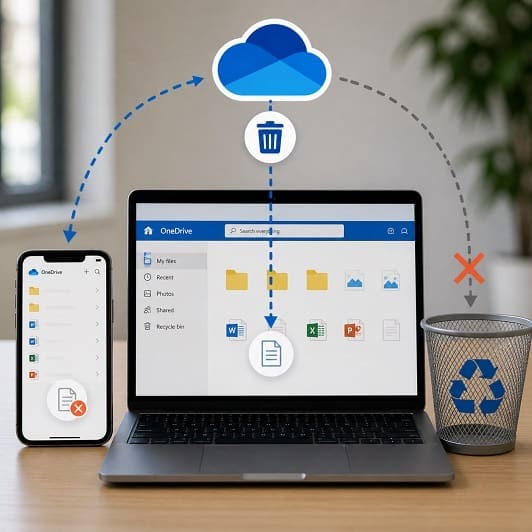
Microsoft is changing how OneDrive handles deleted files, removing a long-standing fallback that many users rely on without realising it and increasing the risk of accidental data loss across synced devices.
What Has Changed In OneDrive?
Although the change is straightforward, it is also significant, because when a file is deleted from the OneDrive website, mobile app, or another synced device, it will no longer appear in the local Recycle Bin on a Windows PC or the Trash on a Mac.
Instead, the file is removed directly from the local device and can only be recovered from the OneDrive web-based recycle bin, which applies even if the file was previously available offline on that device.
Files deleted locally on the computer will continue to behave as expected and appear in the Recycle Bin, with the key difference being where the deletion is initiated, because if it starts in the cloud, the local recovery route no longer exists.
For most users, this represents a change in behaviour rather than a change in capability, and that distinction is exactly where the risk begins.
Why Is Microsoft Making This Change To OneDrive?
Microsoft’s reasoning seems to be focused on performance and consistency, as OneDrive usage has expanded, particularly in business environments with large file libraries and multiple synced devices, making it more complex to manage file state across locations.
By removing the local Recycle Bin step for cloud-initiated deletions, OneDrive can process changes faster and avoid maintaining duplicate recovery paths, meaning that instead of files appearing in multiple locations depending on how they were deleted, there is now a single, central recovery point in the OneDrive recycle bin.
From a system design perspective, this seems to make some sense, as it could simplify synchronisation, reduce overhead, and create a more predictable model for file recovery.
However, what works from an engineering perspective does not always align with how people actually use technology in practice.
The Risk
The core issue is not the removal of recovery altogether but the removal of a familiar and highly visible fallback that users have come to rely on.
For many people, the Recycle Bin is an instinctive fallback, because if something is deleted by mistake, the first place they look is the desktop bin, a behaviour that has been consistent across Windows systems for decades and is deeply ingrained.
However, under the new model, that is no longer true for cloud-initiated deletions, as a file removed via a mobile app or web browser will not appear locally, which can create confusion and delay recovery, particularly if users do not realise the change has taken place.
This is the kind of thing that happens in day-to-day use. For example, a quick deletion on a phone, a shared file removed by a colleague, or a mistaken action in the browser can now bypass the local recovery point entirely, even though in each case the file still exists in the OneDrive recycle bin, but only if the user knows to look there.
Without that awareness, the perceived loss can quickly become a real one, especially if recovery windows expire or if users assume the file has already been permanently deleted.
Operational Impact For Organisations
For organisations, the impact is less about the technical change itself and more about how it alters day-to-day processes around file management and recovery.
From a compliance perspective, UK GDPR and broader data protection responsibilities remain unchanged, meaning organisations are still accountable for ensuring that data can be recovered when needed, even though the route to recovery has changed.
Support teams are likely to see an increase in queries where users cannot find deleted files in expected locations, particularly in the early stages of rollout. Helpdesk processes that previously relied on guiding users to the local Recycle Bin will need to be updated to reflect the correct recovery path through the OneDrive web interface.
There is also a clear training requirement, as users need to understand that the method used to delete a file now determines how it must be recovered. Without that clarity, simple mistakes are more likely to escalate into avoidable support incidents.
Policies and internal documentation should also be reviewed to ensure that any references to local recovery for OneDrive files are accurate, especially in environments with remote working and multiple devices.
Reducing The Risk In Practice
Managing this change effectively comes down to awareness, process, and control.
Users should be informed clearly that cloud-initiated deletions bypass the local Recycle Bin and that recovery must be carried out through OneDrive itself, which is a simple message but one that can prevent a large number of avoidable issues.
Organisations may also want to review retention settings, particularly in business environments where the default 93-day recycle bin period can be adjusted, while extending retention or implementing additional backup solutions can provide an extra layer of protection.
From a technical standpoint, ensuring that version history and backup policies are in place becomes even more important, as the removal of one recovery route increases reliance on others, and those systems need to be robust and well understood.
A Small Change With Wider Implications
This update to OneDrive is a good example of how relatively small technical changes can have disproportionate real-world impact. The functionality to recover deleted files still exists, but the way users access it has changed, and that is enough to introduce risk.
For businesses, the key takeaway is that data protection is not just about systems and policies, but also about how people interact with them. When familiar behaviours are disrupted, even for valid technical reasons, the gap between expectation and reality is where problems tend to emerge.
Organisations that recognise this early and adapt their guidance, support, and controls accordingly will be far better placed to avoid unnecessary data loss and maintain confidence in how their information is managed.
What Does This Mean For Your Business?
For UK businesses, the bigger issue is not the technical change itself but how easily it can create a gap between how systems behave and what users expect to happen.
When a familiar behaviour changes without being widely understood, the risk increases because people continue to act on old assumptions, particularly in fast, everyday situations where files are deleted quickly and without much thought.
This is where data loss risk begins to build, not through system failure, but through misunderstanding, delay, and missed recovery opportunities.
The key response is to take control of that gap. Businesses that clearly communicate how file deletion now works, reinforce the correct recovery process, and ensure appropriate backup and retention measures are in place will be far better positioned to avoid unnecessary disruption.
This story serves as a reminder that cloud platforms continue to evolve in ways that can subtly change risk profiles, and organisations that actively monitor and adapt to those changes will be better placed to protect both their data and their day-to-day operations.
